Archive for the ‘FreeFolio’ Category

Projects, groups, networks, collaboration, sharing and social software

January 20th, 2010 by Graham Attwell

Pontydysgu is involved in a number of European projects. Typically, these projects involve partners from five or more organisations in different countries working together around a hared work plan. Projects can last from two to four years.

One of our main roles is to provide technologies to support project development. This is not unproblematic.

Whilst three or four years ago most projects were content with a simple web page giving access to project objectives and results, we have been trying to use technology to improve collaboration between the partners, who due to distance will usually only meet face to face two or three times a year.

Levels of experience and confidence in technologies varies greatly.

One of the biggest changes in the last two years has been the use of Skype and Flash Meeting for regular audio and video communication between meetings. Both are far from ideal. ‘Can you hear me?’ is still the most common sentence to be heard in many of these meetings. Talking participants through the Windows microphone and video set up panels is still a pain. But overall the use of such simultaneous communication tools has changed both the form and intensity of collaboration.

We have also seen a slow move towards using multimedia. The days when the outputs of projects were limited to downlaodable Word or PDF files is passing. More and more project members are experimenting with podcasts and video, although once more levels of expertise and confidence vary greatly.

Platforms have remained problematic. We experimented with ELGG and Joomla before moving to WordPress. The problem with all is that they were really too difficult for project participants to use. We largely failed to break the pattern to project partners ending us their content to put on the site. And without regular participation, project web sites remained largely static, with only flurries of activity as they were updated.

We have also experimented with social software platforms including Ning and Facebook. Ning is relatively easy to use, although limited in terms of design etc. And critically you lose control over your own data, when using externally hosted applications. Facebook groups are great for notification of events etc. but offer little else. Ownership issues are even more problematic.

We have also initiated a number of bulletin boards but these once more require a critical mass of activity before they really become of social use.

The reason we have looked at these platforms is the desire for more sociability in platforms for projects. That includes the look and feel and ease of use, but especially the foregrounding of presence. Who are the members of a project or network. Who are they working with? What are their interests and what are they doing? WordPress blogs are great but the reality is that few participants can be dissuaded to blog regularly on a project platform.We customised WordPress with a plug in called Freefolio and that helped in terms of showing presence but it was still hard showing participants remotely how to use the back end of WordPress.

Our latest experiment is with the Network for Trainers in Europe website.

The Network has the following aims:

  • Provide an opportunity for exchanging experiences and knowledge though an easy to use web portal. Enable policy makers, managers and trainers to access ideas, materials and opportunities for professional development.
  • Undertake a small-scale survey of the work of trainers and their professional support.
  • Provide access to research and ideas through the organisation of workshops and on-line conferences.
  • Enhance the quality of support for trainers by sharing effective practice.
  • Stimulate new approaches to the training of trainers related to the concept of lifelong learning, knowledge sharing and peer learning.
  • Encourage researchers and trainers to share information and materials based on practical experience.
  • Bring together research and practice from different projects and initiatives throughout Europe.

Essentially the network is designed to bring people interested in the training and support of trainers together to share materials and experiences. We have migrated from the previous WordPress Freefolio site to Buddypress. And although the site is by no means finished (especially the stylingl, NB setting up new accounts is suspended at moment but will be back on by the weekend), I am enthusiastic about the potential of Buddypress. Firstly Buddypress is centred around people and the activities of members, offering much functionality often associated with commercial social software sites. secondly it is easy to use, with little need for users ever to go to the back end. thirdly, through the affordances of the individual and group wires (walls), friending etc. it makes it easy for members to contribute through gesturing rather than being forced to write substantial blog posts.

The proof of the pudding is of course in the eating. Will members use the new site. To some extent that will depend of what activities the project undertakes. But it will be very interesting to see if the use of a full blown social networking application can lead to enhanced communication and collaboration between researchers and trainers drawn form every European country.

Web 2.0, e-Portfolio. PLEs and much more

January 16th, 2009 by Graham Attwell

Before Christmas I did an interview over Skype with Janine Schmidt, Dennis Brüntje, Franz Büchl, Oliver Härtel from the University of Ilmenau in Germany. the title of the interview was ‘Identität 2.0 durch E-Portfolios’ – Indentity 2.0 through e-Portfolios. They have very kindly sent be a transcriot of the interview. A slighly edited versiona appears below. You can also see n more of teh project work on the students’ web site.

JS: Okay. What was the most impressive and effective usage of an ePortfolio you came across so far? Could you please specify your experience?

GA: It’s a hard question. Most impressive and effective use of an ePortfolio. (…) I’ve seen many different people using ePortfolios in many different ways. But of course, it really depends on how you defining ePortfolios in those terms. I think probably the most impressive I’ve seen in formal education was a vocational college in northwest of England where they were using ePortfolios on an auto-mechanics course. And one module on this course they were making a custom car, and they were getting kids who probably haven’t got lots of qualifications really recording their experiences as they went of the work they were doing and reflecting on the work they were doing, so that greatly impressed me.

JS: Okay. So ehm. The second question will be like focal topic for definition and classification of ePortfolios: How do you define ePortfolios and which significant characteristics do ePortfolios have compared to conventional portfolios?

GA: Well firstly and obviously what distinguishes an ePortfolio from an ordinary portfolio is the use of some kind of electronic interfaces, some kind of electronic media. I’d have to say as well I’d say that ePortfolio can be very much mixed, but pretty obviously the use of electronic media gives us a whole new series of capabilities. But after that the definition starts to break down a bit: and I think you can see vaguely three or four different ways in which ePortfolios had been developed and been used. Unfortunately, the predominant thing comes from they’re using higher education and especially from the USA, where they’d been very much used as an assessment vehicle allowing students to record a progress towards preset learning outcomes. Now I don’t think that’s helpful because the students are tended to see them as a part of an assessment regime and in many cases higher education students are already over assessed. And it’s very much limited, the potential of what is seen as legitimate learning. You’ve had another tendency in the UK to see them as a vehicle for planning learning, PDP-processes, which is another way to look at them. Or you’ve got another tendency, which is more of what I favour, which is to see ePortfolios as a way of recording all your learning including informal learning. And of course there is a strand in the literature certainly in the research of ePortfolios which sees ePortfolios as a powerful vehicle or potentially powerful vehicle for reflection on learning. Though I have to say that how that process of reflection is scaffolded and undertaken is less well researched or less well understood and perhaps just a matter of recording, so you got a powerful point about recording learning, assessing learning, reflecting on learning, etcetera, etcetera many different processes and how ePortfolios been used and what they’d been used for, different processes had been emphasized by different people. And to some extend, and this is quite important, some of those processes had been hard coded in ePortfolio-software and series of assumptions made and those assumptions aren’t always made transparent by the people who have developed the ePortfolio applications.

JS: Okay. So the next question would be: Would you rather consider ePortfolios as a loosely composed tool construct or as a specific method used in educational context? Or do you even have a complete different point of view?
(more…)

WordPress upgrade is good news

April 28th, 2008 by Graham Attwell

We have upgraded the Pontydysgu web site to WordPress 2.5.1. I have had only a limited time to look at it but it seems both a big and welcome upgrade. Particularly nice is the new dashboard – for non WordPress users, this is the back end where you do things. In the past the default view provided far too many options, many of which most users would seldom acccess. Now many of these features have been hidden, meaning you do not see them unless you need them.

This is important for me. I know my way round the old Dashboard. But we are using WordPress MU for our Freefolio e-portfolio application. Not only do I worry at the barrier the dashboard design offers to new users, but in focusing on navigating the Dashboard users may be distracted from the primary use of the sofware – to develop their portfolios. It would appear that an update to WordPress MU to incorporate the new features of the WordPress single user version is planned int he near future. This is good news for us.

What is the difference between an e-Portfolio and a Personal Learning Environment?

April 13th, 2008 by Graham Attwell

This is a question which has bothered me for some time as I am involved in developmental projects for both e-Portfolios and Personal Learning Environments. And it could well be that there is little difference, depending on how both applications (or better put, learnng processes) are defined. Of course, if e-Portfolios are seen primarily as a vehicle for assessment then the differences are clear. Simililarly if the e-Portfolio is owned by an institution or course. But if the e-Portfolio is seen as being owned by the learner, is intended to record all learning and is seen as a tool for formative self evaluation and for reflection then the differnces become more fuzzy.

I have had a number of interesting discussions about this issue recently – with Jenny Hughes, Cristina Costa and Mark van Harmelen. Jenny (who loves working with words) talked about the difference between presenting knowledge and representing knowledge. I think this is a valuable distinction. An e-Portfolo is a` place for reflection, for  recognising learning and presneting that learning. A PLE may be seen as a tool (or set of tools) for not only presenting learning  but for also (individually or collectively) developing a representation of wider knowledge sets (ontologies?).

Of course it could be possible to develop a tool set which supports both tasks. But there are different sets of tools involved in those different prcesses and in the interests of si8mplicity and usability it may be better to develop environments which allow flexible access to such different tools or tool sets for different purposes.

Why am i wrestling with such obscure ideas? Pontydysgu is a partner in the EU funded Mature project. Part of our tasks is to research the ‘state of the art’ on these issues and to develop and test PLEs as a process for developing and sharing knowledge. Its going to be interesting.

Freefolio Demo site

February 25th, 2008 by Graham Attwell

The Freefolio demo site is temporary down for maintainance and upgrading – back soon.

Freefolio roadmap

February 19th, 2008 by Graham Attwell

freefolio logo

There seems to be quite a bit of interest in Freefolio, the WordPress based Social e-portfolio we have been developing together with our partners Raycom.

We have put together a roadmap for further development over the next six or so months. If you have ideas for what else should be on the roadmapo please do get in touch. And if you would like to join the development effort that would be most welcome. We are aware that we have slipped in our target of releasing an installable but we have not forgotten.

1. Developing a repository

Integrate a proper (standards based) lightweight document repository for uploading, storing and accessing different digital artefacts (e.g. documents, etc.).

The repository will allow users to store different objects, including text, audio, photographs and video, to access and annotate those objects and to report on their wok in different presentation formats.

Users will be able to share access to their work with those they choose.

The repository will conform to technical standards and will allow users to copy their work to portable media, if they wish. This will facilitate interoperability with other portfolios and learning applications.

For instance if a leaner progresses to university they will be able to transfer their work including multimedia objects.

2. Reporting views, building blocks

Develop a system module for allowing users to present achievements – should be flexible and allow multiple ‘views’. The module will provide templates to allow users to easily present different views of their work for different purposes, for instance for supporting job applications, for applications for further courses or as part of their curriculum activities. The templates will provide structures to assist learners in developing their presentations. Users will be able to choose different objects form the portfolio to form part of the presentations.

Different presentations can be stored within the portfolio or exported to portable media.

Once more users will be able to control with whom they share their presentations.

3. Improvements to profile

Develop system to allow administrator control of profile template.

Also examine feasibility of making links between different people with same interests/goals in the user profile.

The development of the profile template will make it easy for administrators to customise the template for different installations of the portfolio. The ab9lity to automatically link people with similar interests of similar learning goals will facilitate peer group learning and the development of groupwork. The system will allow learners to find materials and posts relevant to their personal and learning interests of their learning.

4. Improvements to the Personal Development Profile (PDP)

Develop reusable template for PDP process. Allow reviewing and reporting on progress towards goals. Allow view of goals and progress over time.

The further development of the Personal Development Profile will allow users to easily view their progress over time, to reflect on that progress and to develop a record. This will assist in developing learners’ abilities for planning and evaluation.

5. Improve groups functionality

Make it easier to form on the fly groups for sharing and collective activities. his will make it possible to develop working areas for different groups of learners, for instance for undertaking shared projects. Work undertaken in groups may be used as part of the presentations as in 2 above.

5. Styling, choice of styles

Allow users choice of style/design.

Research has shown the importance to learners of being able to give their portfolios their own look and feel. We will develop a number of different styles for users to choose from and will facilitate those who are able in developing their own styles.

6. Scaling

Further develop administrative systems to allow easier install and scaling for multiple group use.
Develop an installable version of Freefolio which may in future be installed on clients systems if they wish.

Structured blogging in Freefolio

November 7th, 2007 by Graham Attwell

Several people have homed in on the structured blogging functionality in Freefolio. The templates we have provided are only examples and were designed for particular contexts. I suppose we should have changed them for this release but we really wanted just to get the thing out.

But the possibilities are very considerable. It is not so difficult to write the templates (having said that, I did not code them myself) – they are small XML files. It would not be impossible to develop a custom editor to write the templates. And the XML leaves intriguing possibilities. We have got one somewhere for a book review – will tery to get this one on the demo site – which, when you put the title in – hits the Amazon databases and auto fills the ISBN number, the date of publication etc. and even provides a thumbnail of the cover. OK, nice but gimmicy.

But imagine if we were to be able to hit a database of competences. Users would not be constrained in what they would add to their portfolio but by simple keywords could indicate what competences their learning contributed towards and with a bit more coding we coudl develop a custom report of that learning towards a formal qualification – wherever the learning took place.

Still easier, might be to develop an organisational knowldge base, based on the XML entries in individual blogs.

Non trivial but doable. If anyone has ideas of a little funding to help us do this I would be very grateful, equally does anyone want to join us in working on this?

Another view of Freefolio

November 7th, 2007 by Graham Attwell

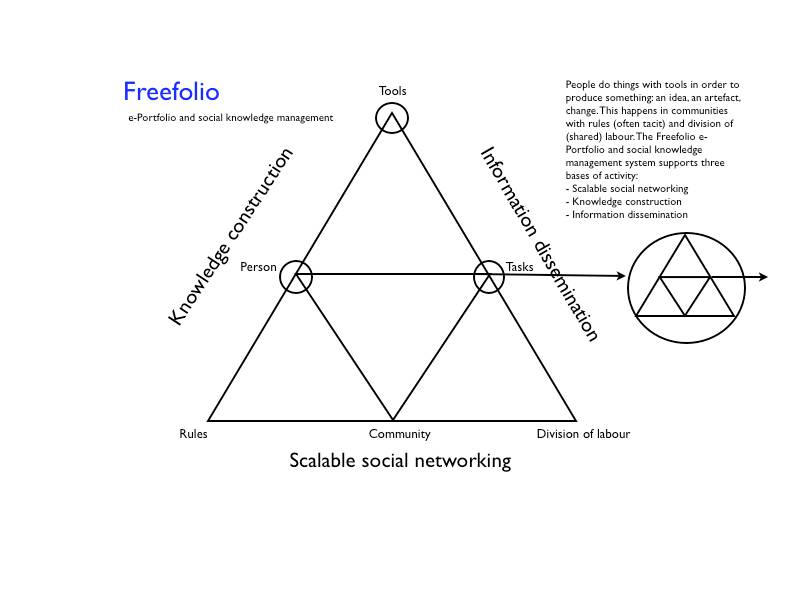
Some people seem best with text, some with diagrammes. Me, I am a text person. I find it hard to understand the graphic representations. But, when I was working on a progress report on the development of Freefolio, I did adapt (or repurpose) an activity diagramme (originally produced by George Roberts for the Emerge project) to show the ideas behind Freefolio. If you are a visual kind of person, this may make sense to you.

Announcing Freefolio – a social e-Portfolio

November 6th, 2007 by Graham Attwell

FreeFolio-LogoAs regular readers of this blog will know, I have spent a lot of time over the last year working on e-Portfolios and Personal Learning Environments. And I get bored just talking about things, I like to do them.

So I jumped at the chance to develop and test an e-Portfolio system. This is the result – Freefolio. The development work has been undertaken by my friend Ray Elferink from Raycom in partnership with Pontydysgu.

Why didn’t we work with an existing system? We thought very hard about it. It seemed that many of the dedicated e-Portfolio systems were too restrictive. They started from an institutional definitions of what learning would be represents through the e-Portfolio. Others – like Mahara – seemed geared towards particular sectors in education. On the other hand many people were using blogging and social networking systems for e-Portfolio development. that was nearer my idea. However, we were concerned that the basic structure of a blog entry did not provide another support for reflecting on learning.

And so we came up with Freefolio. Freefolio is based on WordPress. Within this we have implemented structured blogging, allowing XML templates to be added to the dashboard for particular kinds of post.

The system also features:

a) A space of aggregating community posts – ‘Community Central’
b) An integrated discussion forum
c) A resource area – based on integration of media wiki
d) A learner profile area
e) Learner based access controls
f) User based sidebars through widgets
g) A standards compliant (Europass) CV with different formats for export

There is more work to do – isn’t there always – and we know this version may not support everything you want of an e-Portfolio. But it is Open Source and easily extendable.

Want to have a look? Go to http://demo.freefolio.net and set yourself up with an account (don’t worry if you get a rather strange name on the from field on the confirmation email – we will sort that as soon as Ray gets access to the server).

I have tried to populate the site with a little content. Please add some of your own. And tell us what you think.

We are planning to host Freefolio installations in the future for organisations who want this. And of course, we can build new features and customised versions.

But, if you want to install Freefolio yourself, we will be releasing the code in the very near future. And we will be developing a web site around the demo install. I will write more about Freefolio over the coming days. But now is the time to put it out, I think. Release often, they say.

Technorati Tags: , ,

  • Search Pontydysgu.org

    News Bites

    From a Jisc press release:

    Over 14,000 items of archived TV footage from 17 European countries are now available via the EUscreen online portal for teaching, research and general interest.

    EUscreen – the result of a collaboration between 36 partners across Europe – provides a rich insight into Europe’s television heritage with content dating from the 1920s to the present day.

    The portal includes rare footage and commentary on key events in history, including a 1962 interview with Martin Luther King about racial discrimination in the US.

    John Ellis, Professor of Media Arts at Royal Holloway and principal investigator on the EUscreen project, said: “This is a valuable resource for anyone interested in social history or indeed TV history, as it brings together tens of thousands of clips from across Europe. The portal is available to anyone (not only academics) and it is very easy to get absorbed and spend hours browsing all of the footage.”

    The expansive footage has also proved popular as a learning aid for foreign language students, with clips available in 14 languages.

    By the end of September 2012, there will be around 30,000 items of digital content freely available on the portal as the European providers continue to add carefully selected material.

    Explore the EUscreen footage


    Open online seminar

    Jisc are hosting an open, online seminar on ‘Making Assessment Count (MAC)’ on Friday 3rd Feb – 1-2pm. The presenters are Professor Peter Chatterton (Daedalus e-World Ltd) and Professor Gunter Saunders (University of Westminster).

    The mailing for the seminar says” “The objective of Making Assessment Count is primarily to help students engage more closely with the assessment process, either at the stage where they are addressing an assignment or at the stage when they receive feedback on a completed assignment. In addition an underlying theme of MAC is to use technology to help connect student reflections on their assessment with their tutors. To facilitate the reflection aspect of MAC a web based tool called e-Reflect is often used. This tool enables the authoring of self-review questionnaires by tutors for students. On completion of an e-Reflect questionnaire a report is generated for the student containing responses that are linked to the options the student selected on the questionnaire.”

    You can find out more ans sign up for the seminar at  http://jiscmac.eventbrite.co.uk/


    EC-TEL 2012

    The EC-TEL 2012: Seventh European Conference on Technology Enhanced Learning 21st Century Learning for 21st Century Skills takes place on 18-21 September 2012 at Saarbrücken in Germany.

    The focus for the conference includes:

    - How can schools prepare young people for the technology-rich workplace of the future?
    - How can we use technology to promote informal and independent learning outside traditional educational settings?
    - How can we use next generation social and mobile technologies to promote informal and responsive learning?

    The deadline for proposals is April 2.


    Visitors and Residents

    David White (University of Oxford) and Dr. Lynn Silipigni Connaway (OCLC) have been attracting quite a stir with their JISC-funded work on Visitors and Residents: What Motivates Engagement with the Digital Information Environment?, being undertaken as part of the Developing Digital Literacies programme webinar series.

    Slides, audio and a recording of the Blackboard Collaborate session where they presented some of the findings of their work can be found at http://bit.ly/jiscdiglitvr.


    ECER 2010

    The keynotes, videos, radio shows and interviews from the ECER 2010 Conference in Helsinki:

    On the ECER 2010 website.

    Taccle handbook for teachers order form

    Here you find the Taccle handbook for teachers order form.

    Twitter

    Follow Graham Attwell on Twitter Follow Cristina Costa on Twitter Follow Dirk Stieglitz on Twitter

    Other Pontydysgu Spaces

    • Pontydysgu on the Web

      blip.tv
      Watch the Pontydysgu Videos
      pbwiki
      Our Wikispace for teaching and learning
      Sounds of the Bazaar Radio LIVE
      Join our Sounds of the Bazaar Facebook goup. Just click on the logo above.

      Our next programmes will be live from the German Moodlemoot in Emsden. Full details coming soon

  • Sounds of the Bazaar AudioBoo

  • Recent Posts

  • Archives

  • Meta

  • Upcoming Events

      There are no events.
  • Categories